

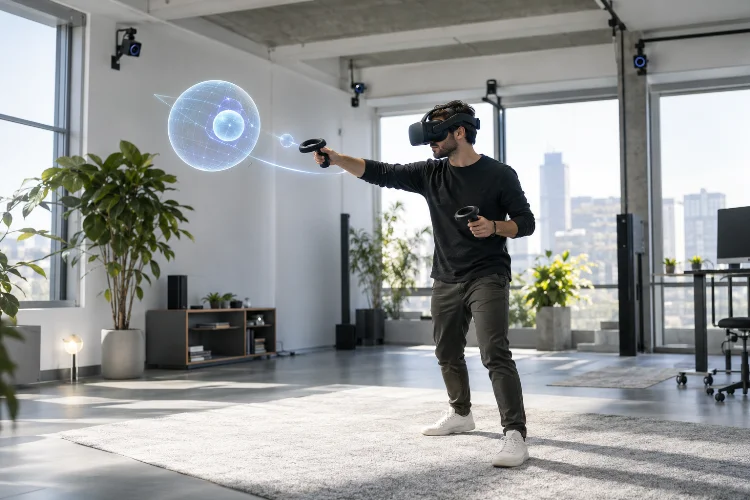
One of the fastest ways to break immersion in virtual reality is surprisingly simple: move your head and watch the virtual world react incorrectly.
Even beautiful graphics cannot hide poor tracking. If a digital table appears to shift when you lean toward it, or your virtual hand floats several centimeters away from your real controller, the brain immediately notices that something is wrong.
This is why spatial tracking in advanced VR systems is so important.
Modern headsets continuously estimate where the user’s head, hands, controllers, and sometimes other body parts are located in three-dimensional space. That information allows the virtual environment to respond naturally to physical movement.
Spatial tracking is not one technology working alone. Cameras, inertial sensors, computer vision, coordinate systems, pose prediction, and software algorithms cooperate to create a stable relationship between the user and the digital world.
When these systems work well, users stop thinking about tracking entirely. They simply look, reach, crouch, walk, and interact as though the virtual environment actually surrounds them.
Spatial Tracking Connects Physical and Virtual Movement
Spatial tracking essentially answers two questions: where is the user, and how are they moving?
A VR headset needs this information continuously. Every movement of the head changes the viewpoint from which the virtual environment should be rendered.
Modern XR APIs represent tracked devices through positions and orientations within defined coordinate spaces.
OpenXR, for example, allows applications to locate one spatial reference relative to another at a specified time, enabling headsets and controllers to maintain meaningful positions inside an XR environment.
Consider leaning toward a virtual desk.
Without positional tracking, the image might remain at the same distance. With proper spatial tracking, your viewpoint moves forward and slightly downward, revealing parts of the desk that were previously hidden.
That relatively simple response creates powerful depth cues.
The brain expects visual perspective to change when the body moves. When the headset reproduces those changes correctly, the digital scene begins behaving more like a physical place.
Six Degrees of Freedom Make VR Feel Spatial
Early VR experiences sometimes relied primarily on rotational tracking.
Users could look up, down, left, and right, but physically moving forward or sideways did not necessarily change their position inside the virtual world.
Advanced systems typically use six degrees of freedom, commonly called 6DoF.
Three degrees describe rotation: pitch, yaw, and roll. The remaining three represent movement along the X, Y, and Z axes.
This means users can rotate their heads while also moving forward, backward, sideways, upward, or downward.
Microsoft’s documentation describes how 6DoF tracking enables seated, standing, and room-scale experiences in which users can physically move through tracked spaces.
That difference matters enormously.
Imagine examining a virtual sculpture. Instead of rotating it with a controller, you can physically lean around one side, crouch to inspect its base, and step backward to view the complete object.
The interaction feels intuitive because your physical movement becomes part of the interface.
Inside-Out Tracking Removes External Barriers
Spatial tracking once commonly depended on external cameras or base stations positioned around a room.
Many modern standalone headsets instead use inside-out tracking.
Cameras mounted directly on the headset observe the surrounding environment. Software identifies visual features and estimates how the headset moves relative to them.
Meta describes its current head-tracking approach as inside-out tracking that combines onboard cameras with sensors such as accelerometers, gyroscopes, and magnetometers to estimate device position and orientation in three-dimensional space.
This approach makes advanced VR considerably easier to set up.
Users no longer necessarily need to permanently install tracking hardware throughout a room before entering VR. They can put on the headset, establish a play area, and begin.
However, inside-out systems face their own challenges.
Poor lighting, reflective surfaces, featureless walls, or cameras temporarily losing sight of controllers can reduce tracking quality. Developers must therefore design experiences that remain usable when tracking becomes temporarily imperfect.
Sensor Fusion Produces More Reliable Motion Data
Cameras alone are not enough.
Visual tracking can provide detailed information about movement through an environment, but processing camera frames takes time. Inertial sensors operate much faster, although their estimates may gradually accumulate errors.
Modern VR systems combine several data sources through sensor fusion.
An accelerometer measures changes in movement. A gyroscope detects angular velocity. Cameras help determine the headset’s position relative to visual features in the surrounding environment.
Together, these signals compensate for one another’s weaknesses.
Fast inertial measurements can capture rapid motion, while visual information helps correct accumulated drift. The resulting pose estimate is generally more useful than relying on either sensing method independently.
This combination must happen continuously and with extremely low delay.
If the estimated pose arrives too late, the rendered viewpoint may represent where the user’s head was rather than where it currently is. Even relatively small timing differences can make a scene appear less stable.
Good sensor fusion therefore improves both tracking accuracy and perceived responce.
Reference Spaces Keep the Digital World Stable
Knowing the headset’s position is only part of the problem. The system also needs a stable frame of reference.
Suppose a virtual chair is placed two meters in front of the user.
When the user walks around it, the chair should remain in exactly the same virtual location rather than following the headset.
OpenXR handles this concept through spatial reference spaces. Its specification defines reference types such as VIEW, LOCAL, LOCAL_FLOOR, and STAGE, giving applications different coordinate frameworks for positioning tracked devices and virtual content.
These coordinate systems allow developers to distinguish between content that should move with the user and content that should remain fixed in the environment.
Microsoft similarly describes world-locked content as digital content that remains positioned within a spatial coordinate system as the user moves around it.
Without stable spatial references, objects can drift or shift unexpectedly.
That may seem like a small technical error on a monitor. Inside a headset, however, an apparently solid wall moving as the user walks past it can instantly destroy presence.
Controller and Hand Tracking Extend the Sense of Presence
Head tracking establishes where users are looking, but immersive interaction becomes much stronger when the system also understands their hands.
Tracked controllers provide position and orientation data that can be translated into virtual hands, tools, weapons, pointers, or other objects.
Unity’s XR tracking APIs, for example, expose tracked nodes representing the user’s head, left hand, right hand, eyes, controllers, and other tracking references. Position, rotation, velocity, and other states can then be used by an XR application.
Hand tracking can push this idea even further.
Instead of holding controllers, users may reach toward virtual objects directly with their fingers. Computer vision systems estimate hand poses and convert physical gestures into digital interaction.
Accuracy becomes especially important at close range.
A virtual hand that is only slightly misplaced can look obviously incorrect because users already know exactly where their real hands are located. Good tracking needs to make reaching and grabbing feel almost automatic.
When successful, the user’s body becomes part of the virtual interface rather than something separate from it.
Tracking Prediction Helps Compensate for System Delay
Every tracking system has latency.
Sensors collect measurements, algorithms process those measurements, an application updates the scene, the GPU renders it, and the display finally presents the image.
During those milliseconds, the user’s head may continue moving.
Advanced XR systems therefore use prediction to estimate where a tracked device is likely to be when a future frame reaches the display.
OpenXR allows applications to request the location of a space for a specified time. For future times, the runtime can provide its current prediction of where that space will be.
Prediction helps maintain visual stability during normal head movement.
Imagine quickly turning toward a virtual doorway. Rendering exclusively from an older measured pose could cause the image to trail slightly behind. Predicting the future pose helps align the displayed view more closely with the user’s actual orientation.
Prediction is not magic, however.
Sudden unpredictable motion is naturally harder to estimate. Accurate tracking, efficient rendering, and low-latency processing still matter.
The strongest VR systems combine prediction with fast hardware rather than depending on prediction to compensate for poor performance.
Tracking Errors Can Quickly Break Presence
Users often barely notice good spatial tracking.
They notice bad tracking immediately.
Common problems include jitter, drifting objects, lost controller positions, delayed virtual hands, incorrect floor height, and sudden changes in the tracking origin.
A small amount of jitter can make distant objects appear unstable. Drift can cause stationary objects to slowly change position. Incorrect floor calbration may make users feel unusually tall or short.
Applications should therefore monitor tracking states rather than assuming every pose is always valid.
OpenXR provides flags indicating whether position and orientation data are valid and currently tracked. Unity similarly exposes whether XR nodes are actively being tracked.
Graceful failure is important.
If hand tracking disappears briefly, freezing the virtual hand, hiding it carefully, or switching interaction modes can be less distracting than allowing it to jump unpredictably.
Good VR design accounts for imperfect conditions before users encounter them.
Spatial Tracking Also Improves VR Interaction Design
Accurate tracking does more than increase visual realism. It changes what developers can design.
Room-scale experiences can ask users to physically walk between objects. Fitness applications can detect large body movements. Training simulators can require users to reach toward realistic equipment positions.
Spatial information can also improve interfaces.
Instead of navigating flat menus, users can interact with controls positioned naturally around them. Virtual buttons can respond to proximity, objects can be inspected from multiple angles, and environmental interactions can depend on where the user is standing.
Unreal Engine’s XR framework provides access to tracking systems that enumerate XR devices and query their poses, while its broader XR tools support motion controllers, hand tracking, and other input methods.
This is where spatial tracking becomes more than an engineering feature.
It becomes a design language.
The physical position and movement of the user can become part of gameplay, navigation, communication, training, and storytelling.
Spatial tracking is one of the technologies that transforms virtual reality from a screen attached to your face into a believable three-dimensional environment.
By combining 6DoF movement, inside-out cameras, inertial sensors, sensor fusion, stable coordinate spaces, hand tracking, and pose prediction, advanced VR systems can make digital objects remain convincing as users physically explore them.
The most effective tracking often goes unnoticed. Users simply move naturally while the virtual world responds exactly as expected.
For VR developers, that makes tracking quality a core part of immersion rather than a background technical feature.
Test spatial stability early, design around realistic tracking limitations, and pay close attention to how virtual content responds to real movement. The more naturally the two worlds align, the easier it becomes for users to feel genuinely present.
